Residents on their phones
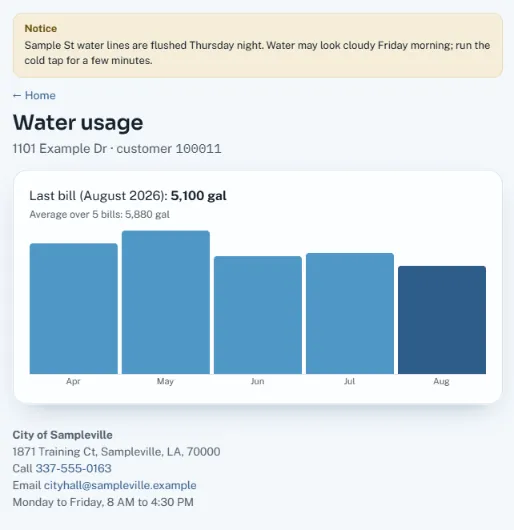
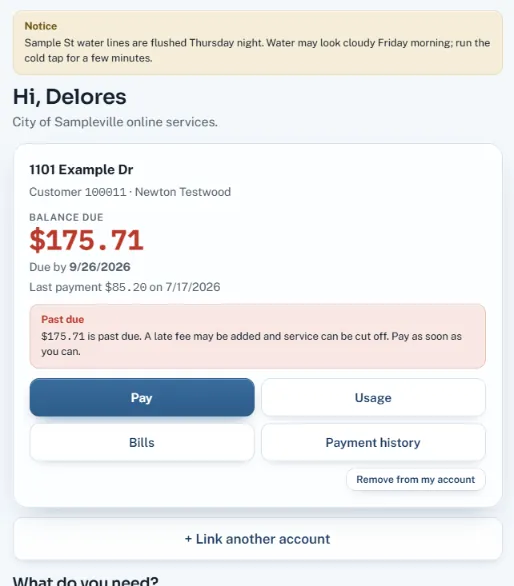
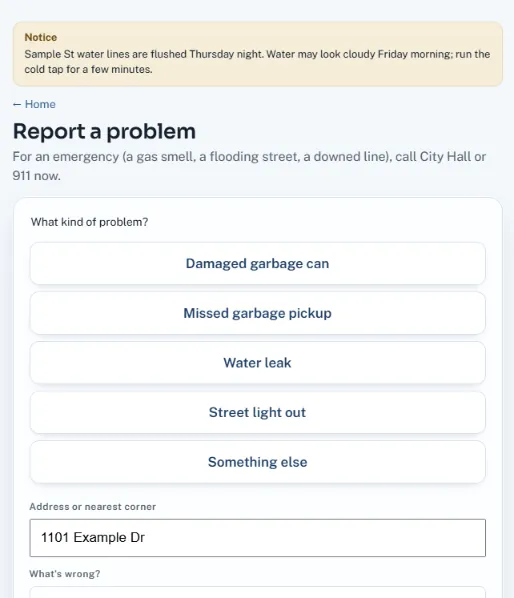
The resident portal is designed for small screens first: big buttons, short forms, pay in a few taps.

CivicSuite puts cashiering, utility billing, permits, licensing, court, purchasing, payroll and the general ledger behind one login — with a resident portal where people pay online by card or e-check. Built by LogicWorx in South Louisiana.
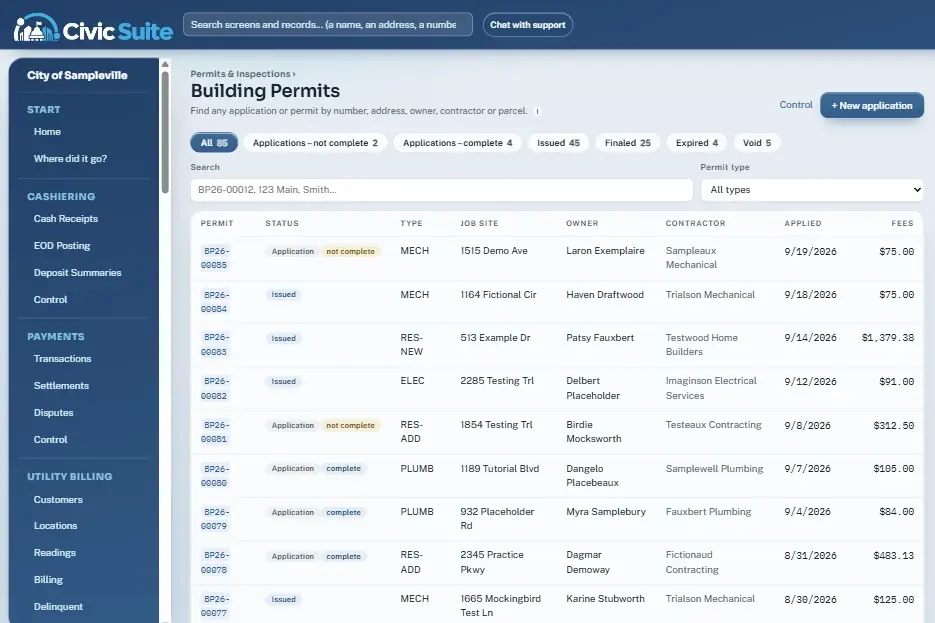
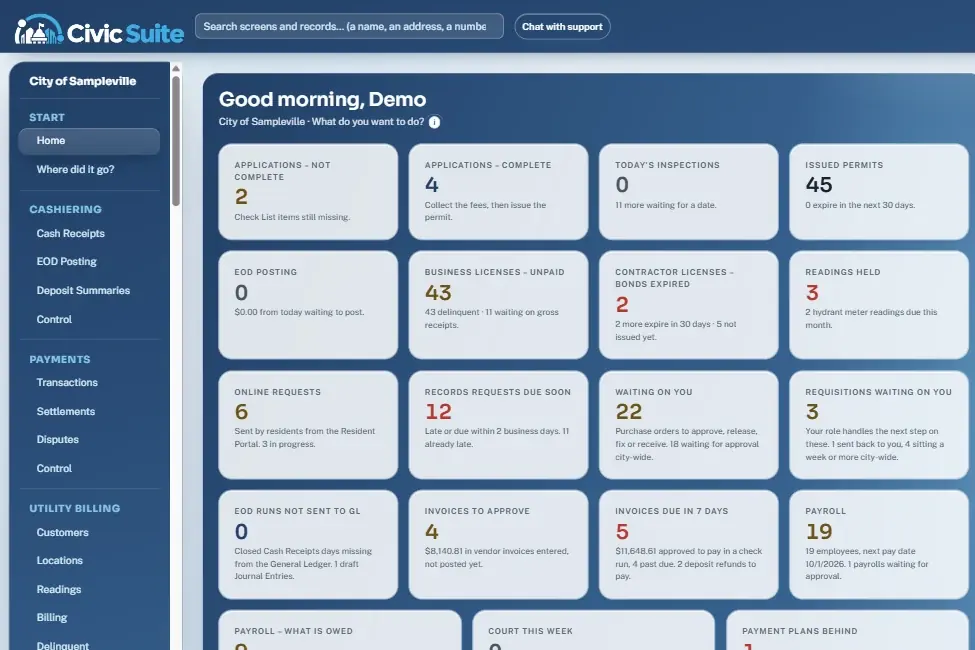
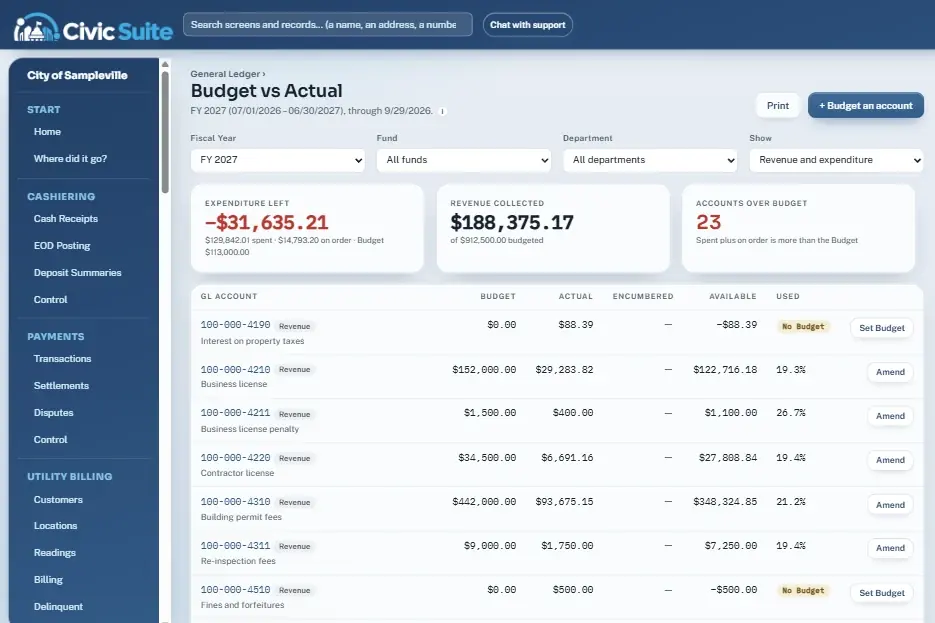
Real screens from the live demo, filled with made-up sample data. Click a module — or just watch.
Every clerk starts the day on a dashboard that counts what's waiting across every department — permits ready to issue, unpaid licenses, held meter readings, records requests near their legal deadline, invoices to approve and payroll to review.
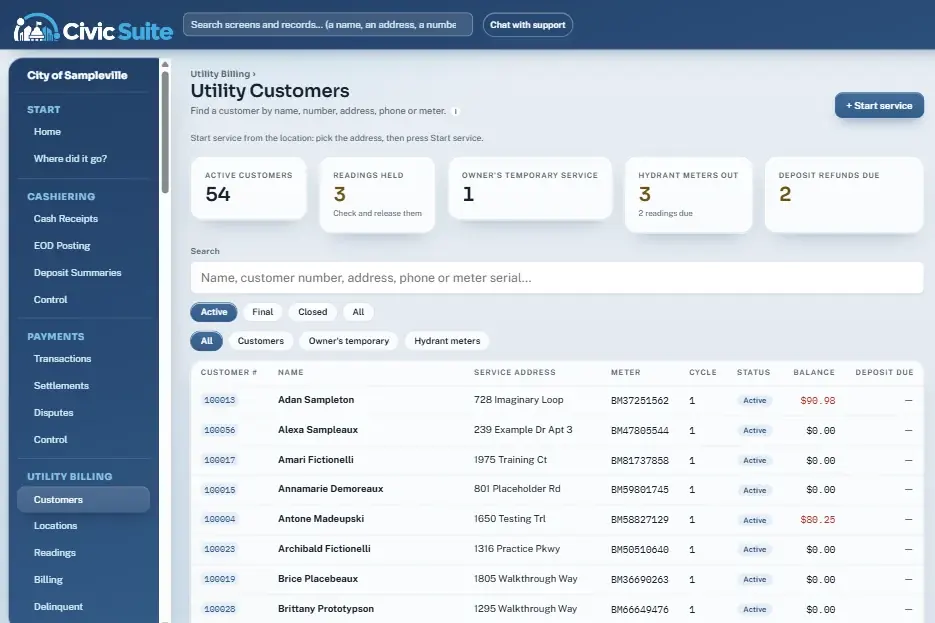
Look up any customer by name, number, address, phone or meter serial. Start and stop service from the location, import meter reads, and bill a cycle only when every reading is in and cleared.
Permit numbers are assigned the moment an application is saved, fees are figured as you type, and a Check List must be complete before the permit can issue. If the button is grey, the page says exactly what's missing.
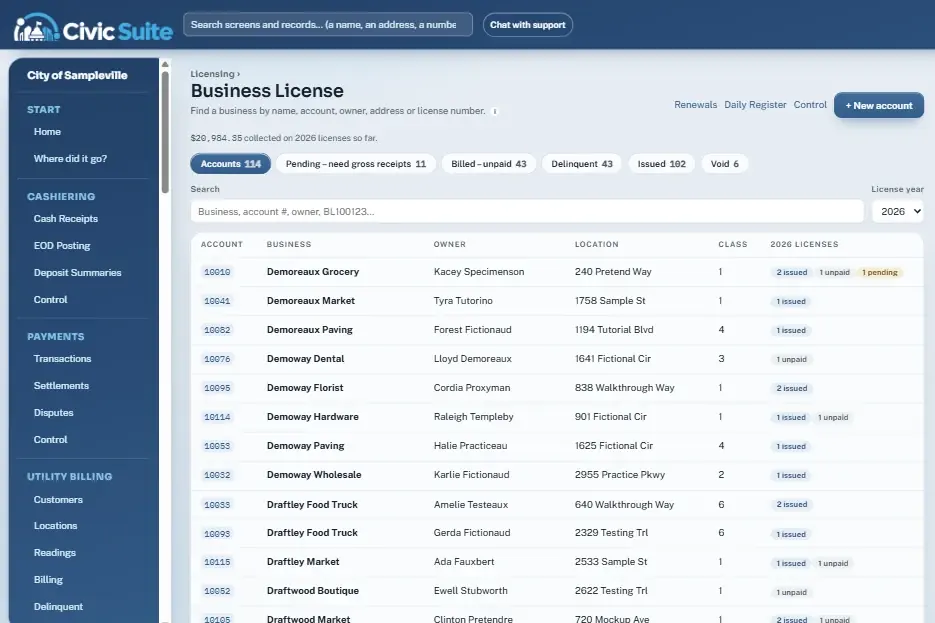
One account per business with every year's license on it. Enter gross receipts and the fee is figured from the class rate table; late licenses pick up the penalty automatically.
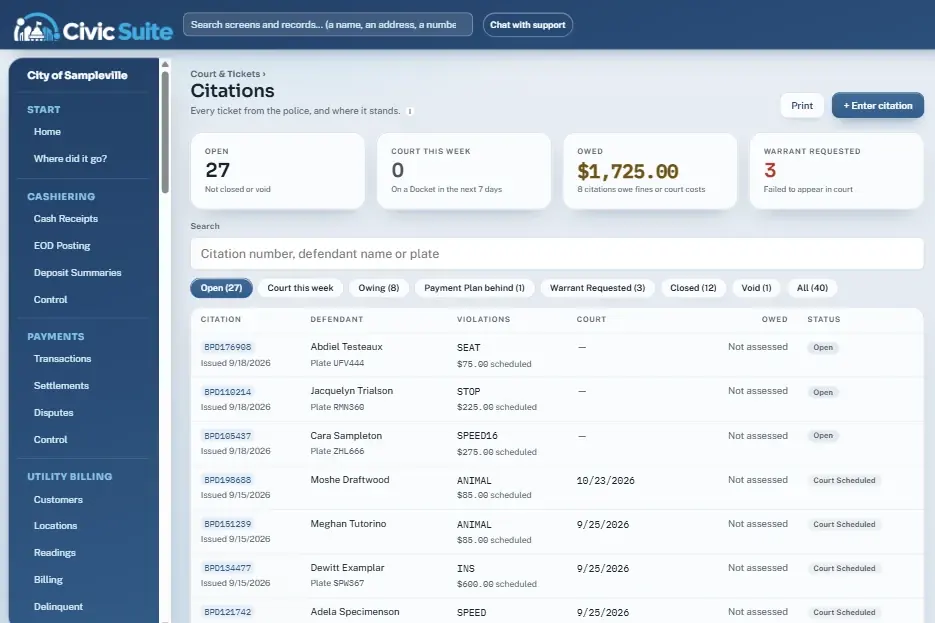
Enter citations from the police copy, schedule them on a docket, record dispositions, and take payments at the counter. Payment plans that fall behind rise to the top.
Every module posts to one general ledger, so finance sees real numbers without re-keying. Open purchase orders show as encumbered before an invoice ever arrives.
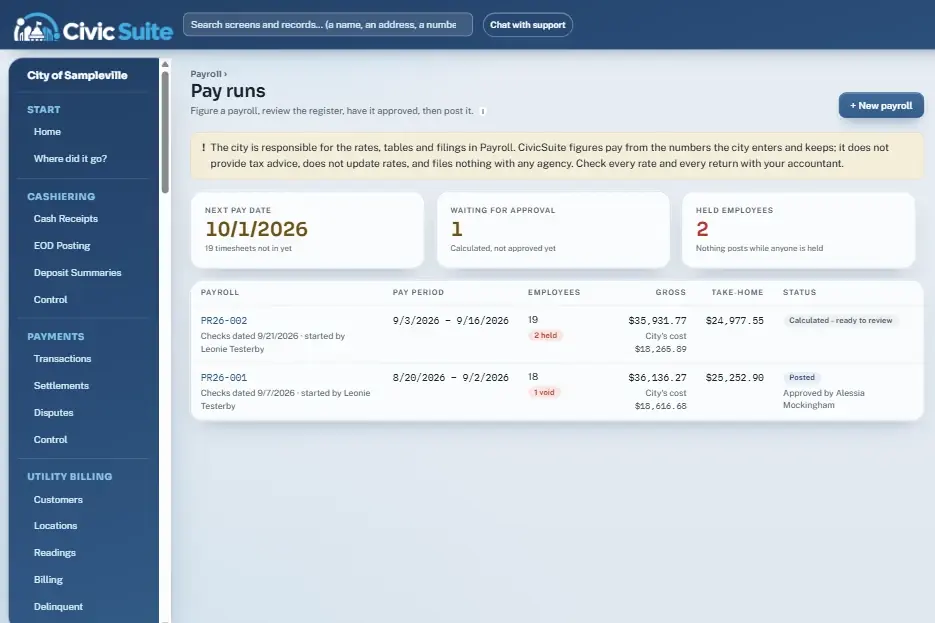
Load approved timesheets, calculate, review the register, have a second person approve, then post. Anyone on hold blocks posting until they're cleared.
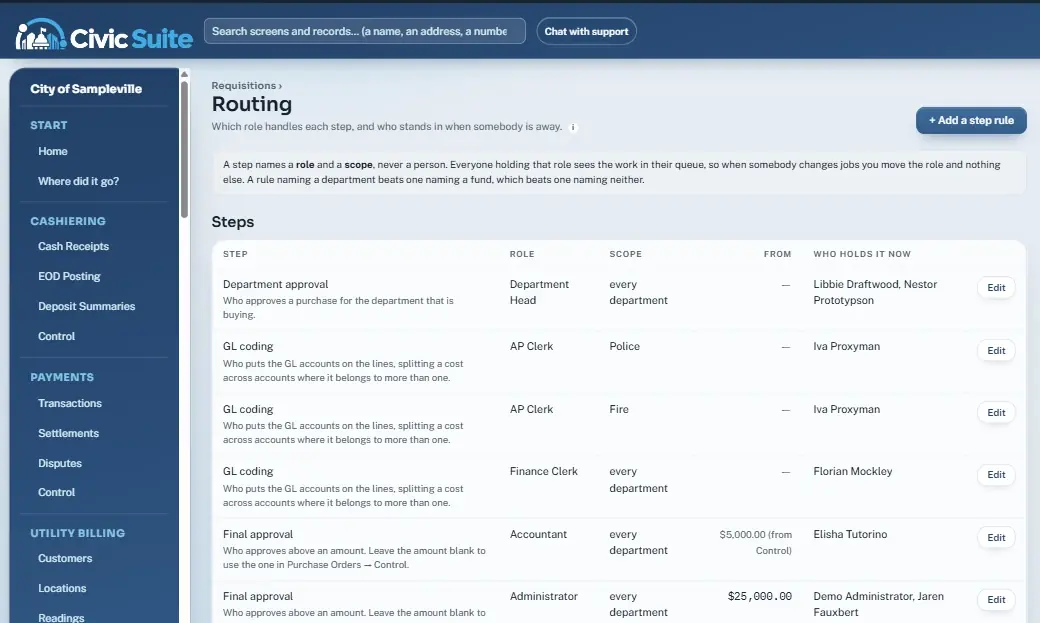
Each step names a role and a scope. Everyone in that role sees the work in their queue, so a vacation or a job change never stalls a purchase — move the role and nothing else.
Residents stop calling and driving in. They open the city's portal on their phone and take care of it themselves, and every request lands in the right queue at City Hall.
Water bills and other city balances by card or e-check, any hour.
Balance, due date, every bill, a usage chart and full payment history.
Moving in or out? Request it from the phone. Staff finish it in one click.
Missed pickup, water leak, street light out. It lands in City Hall's queue.
File a request and follow it under My requests until it's answered.
Line flushing and boil advisories at the top of every page, plus opt-in texts and emails.
In the live demo, open Jump to… → Resident portal.
No app to install and nothing to download. CivicSuite runs in the web browser, so it goes wherever your people and your residents go.
The resident portal is designed for small screens first: big buttons, short forms, pay in a few taps.
The inspection schedule works on a phone. Tap an address for the map, tap a number to call the contractor.
Desktop at the counter, laptop in the council meeting, tablet on the road. One login, the same screens.
A payment taken at the counter shows on the permit, posts at end of day, and lands in the general ledger — without anyone typing it twice.
Take payments at the counter, close the day with EOD Posting, and reprint any day's deposit summary.
Take cards and e-checks at the counter, by phone and online. Processor deposits matched and posted gross, fees and net.
Customers, meters, readings, bills and deposits on one screen. Odd readings are held before a bill run.
Fees figured as you type, a Check List that gates issuing, and an inspection schedule that works in the field.
Gross-receipts rate tables, automatic late penalties, and renewals that are safe to run twice.
Bonds, insurance and state license dates tracked. Expired paperwork blocks the permit.
Citations, docket, dispositions, payment plans and warrant-requested tracking.
Requests route to the role that handles the next step, with quote thresholds and out-of-office stand-ins.
Approvals by department and amount, PO numbers that never collide, receive and close from the PO.
Journal entries, account inquiry, trial balance, budget vs actual and year-end close.
Invoices matched to purchase orders with tolerances, check runs, check register and 1099 figures.
Timesheets, time-clock import, volunteer fire pay, two-person approval and what-is-owed tracking.
Import the roll, apply millages, certify, print notices and track delinquent interest.
Invoice customers, set up recurring monthly charges and watch aging.
Deadlines figured in business days, response letters and copy fees, late requests listed first.
Attach files or phone photos to any record. Deletes are hidden and logged, never destroyed.
Bill, past-due and court reminders to people who opted in. STOP opts out. Quiet hours respected.
Residents pay online by card or e-check, check balances and history, request service changes, report problems and file records requests.
CivicSuite was designed around the people at the counter and in the finance office — not around a database.
Press / or Ctrl+K on any page to jump to a screen — or a customer, permit, citation, invoice, vendor or parcel by number, name, street or phone.
Every record says what to do now. When a button is grey, the page lists exactly what's missing instead of throwing an error.
Approvals route to a role and a scope. Stand-ins cover vacations. When someone changes jobs, you move the role and the queue follows.
Posted entries never change — corrections are reversing entries. Receipt, permit and license numbers are handed out automatically and never repeat.
Social Security and bank numbers are stored encrypted and shown as the last 4. Seeing a full number takes its own permission and is written to the audit log.
Odd meter readings hold a bill run. Held employees hold a payroll. Invoices over the PO stop until someone accepts the difference, with a reason.
CivicSuite is the biggest thing we've built. The same team builds automations, AI tools and websites for businesses across Louisiana and beyond.
Lead follow-up, intake, approvals, document processing and reporting that run on their own — connected to the tools you already use.
AI AutomationsAI assistants trained on your documents, internal tools and full applications — like CivicSuite — built for how your team actually works.
Custom AI & SoftwareFast, good-looking sites with CRM, forms, AI chat, reviews and social scheduling built in — and hosted where your marketing already lives.
GHL WebsitesWhat people ask us about CivicSuite and LogicWorx.
CivicSuite is web-based software, built by LogicWorx, that runs City Hall in one system: cashiering, card payments, utility billing, permits and inspections, business and contractor licensing, court and citations, requisitions and purchasing, general ledger, accounts payable, payroll, property tax, public records requests, documents, text and email notices, and a resident portal. Staff sign in once and every module posts to the same general ledger.
Aging municipal software, and the spreadsheets, paper logs, SharePoint forms and email chains that grow up around it. A built-in “Where did it go?” page maps every old menu item to where it lives in CivicSuite, so staff can find their work on day one.
Yes. The CivicSuite resident portal lets residents pay utility bills and other city balances online by card or e-check from their phone or computer. Online payments post alongside counter payments, and processor deposits are matched to them automatically.
It runs in a web browser and is hosted on Microsoft Azure. There is nothing to install on staff computers, and field screens like the inspection schedule work on a phone.
Yes. The live demo is open to anyone and uses made-up sample data for a fictional City of Sampleville, with a guided tour. Scan the QR code at our booth or click Try the Live Demo at the top of this page.
LogicWorx, LLC is a South Louisiana company that builds AI automations, custom AI tools and software, and websites hosted on GoHighLevel. CivicSuite is our flagship product. LogicWorx was founded by Chad Landry, owner of Acadiana Network Solutions, a managed IT and cybersecurity provider in Broussard, Louisiana.
Yes. We design, build and host business websites on GoHighLevel with the CRM, forms, AI chat, review requests and social scheduling connected from day one — and structured data that helps AI assistants and search engines understand your business.
Open the live demo on your phone or laptop — a guided tour walks you through a day at City Hall. Or book a walkthrough and we'll show you the modules your city cares about.